
Find your way around
Welcome to Wheelson's usage guide!
Hopefully, you had fun assembling your Wheelson. Are you ready to grow a bit more? We are going to show you how to use Wheelson in this usage guide!
Let's turn Wheelson on!
Using the switch located at the back of Wheelson, switch him on by pushing it to the right.

First time?
If this is your first time ever turning on the Wheelson, you should see the hardware test pop up. This is a cool little bit of software that will allow you to go through and make sure that you've assembled your Wheelson correctly! Follow the on-screen instructions at each stage and, if there is an issue, check your soldering!

My camera is upside down!
If your camera is displaying an upside-down image, go to Wheelson's settings and locate the 'Cam Rotation' option. It will likely be set to OFF by default—change it to ON. This will correct the image and display it normally.

Running out of gas? Let's charge Wheelson.
Using the included USB cable, insert it into the USB port on the back of Wheelson. A white LED will light up while it's being charged, once it is fully charged, the LED will turn off.
The USB-C cable is used for charging and programming your device. Insert the other end of the cable into the power adapter for charging and into your laptop for programming.

Frozen? Use the RESET Button
Got an issue with Wheelsons software or just want to do a RESET? Press the RESET button located on the back of Wheelson, this should RESET Wheelsons system fixing a problem!

Navigate through Wheelson's menu
This is Wheelson's menu. There are five options to choose from:
- Simple Programming- Create fun little programs on Wheelson himself, using a blocky interface to tell Wheelson where to go!
- Line tracking- Using Wheelsons camera and some black electrical tape, make him follow a line to wherever you want!
- Ball tracking- Hold a ping pong ball in front of wheelson and make him follow it!
- Marker tracking- Using the included cards, hold them in front and Wheelson will read them and do different things!
- Settings- Adjust the volume, brightness and perform an input test if needed

Navigate through Wheelson's menu by using the 4 directional buttons on Wheelson's control panel like in the photo.
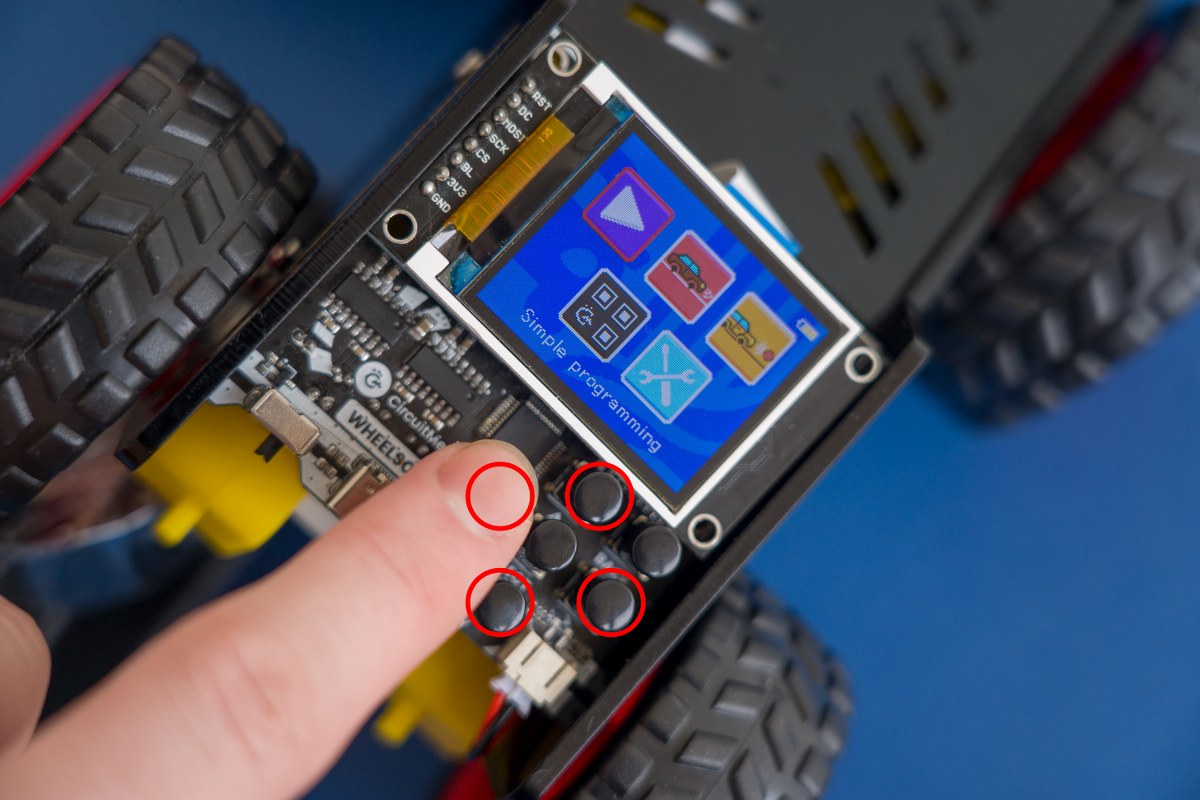
When you choose what option to pick in the menu, press the middle button to select it. The option that you selected should appear on display.

How to go back?
To exit one of the options that you selected, press the top right button on Wheelson's control panel.
You can do that every time you wish to exit any of the options.

Let's go over all the menu options, one at a time, starting with the 'Simple Programming' option...